ATS friendly resume format in 2026: what actually parses

The applicant tracking system is the gatekeeper most job seekers never see, and most advice about it repeats a statistic that was never real. Here is what the data says, and what actually parses.
Almost every large employer now screens applications through an applicant tracking system before a human opens them. What that system does, and what it does not do, is badly misunderstood, and most of the advice written about it is repeating a statistic that was never real.
The 75% myth, and what the data actually says
The claim that 75% of resumes are rejected by an ATS before a human sees them is not supported by any published study. It traces back to a company that shut down in 2013 and never released the underlying data, and it has been copied between career blogs ever since.
What is documented is narrower and more useful. Roughly 98.8% of Fortune 500 companies run an ATS, so the software is genuinely between you and the recruiter. But an analysis of more than 1.7 million applications found that the systems do not auto-reject on a score. They parse, they index, and they rank for a recruiter who then filters. The rejection happens downstream, and usually for a reason you can control.
Sources for this section: Jobscan's 2026 ATS Usage Report on Fortune 500 adoption, Huntr's analysis of 1.7M+ applications, and ResumeAdapter's 2026 traceback of the 75% figure. We link them because a page that cites nothing is asking you to trust it, and you should not.
What an ATS actually does with your file
An ATS converts your document to plain text, then tries to slot that text into database fields: name, contact, employer, job title, dates, skills, education. Everything else about your file is discarded.
- The layout is not stored. Only the extracted text and the fields it filled.
- Reading order comes from geometry, not from what looks right on screen.
- Images, icons and anything drawn rather than typed contribute nothing.
- A field the parser cannot fill is simply empty, and an empty field cannot match a search.
We measured it: what a two-column CV does to a parser
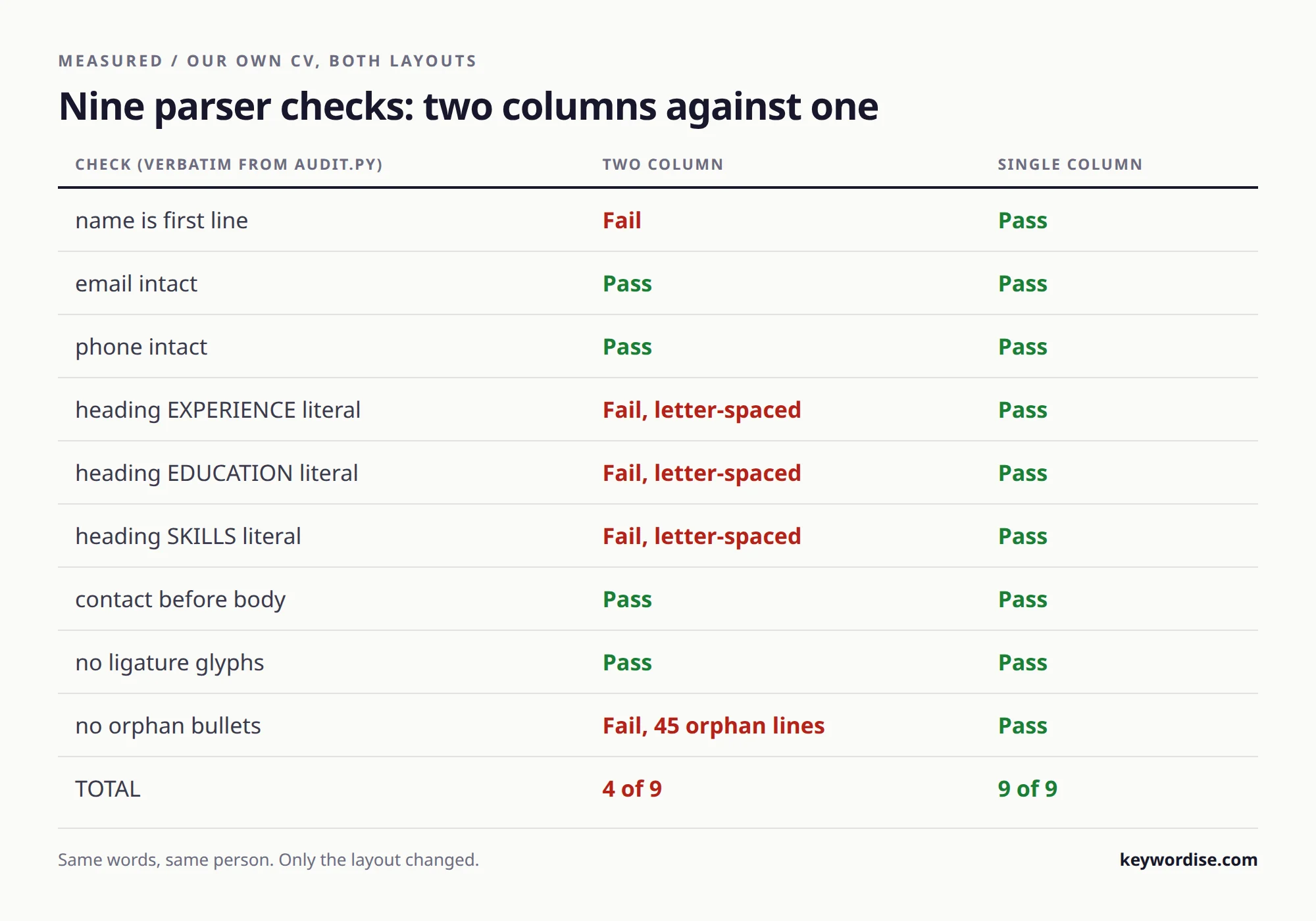
We rendered the same CV in two layouts, extracted both with pdfminer, and scored them on the nine things a parser has to get right. The designed two-column version scored 4 out of 9. The single-column version scored 9 out of 9. Same words, same person.
| What the parser has to get right | Two columns | One column |
|---|---|---|
| First line read is your name | No, it read the summary | Yes |
| Section headings readable | No, extracted as E X P E R I E N C E | Yes |
| Contact details outside job entries | No, 15 fragments landed inside | Yes |
| Email and phone intact | Yes | Yes |
The detail that surprised us: a column-aware parser did not rescue it either. Both parser families failed the two-column file. The letter-spacing that makes a designed heading look good writes each letter at its own coordinate, so the extractor inserts spaces and the heading stops being a word.
Which system you are facing changes the answer
The major platforms fail differently, and you can usually tell which one you are dealing with from the apply URL. That single clue tells you how careful to be.
| System | URL contains | Known behaviour |
|---|---|---|
| Workday | myworkdayjobs.com | Reads left to right across the full width. Columns interleave. Wants standard headers. |
| Taleo | taleo.net | Older parser, struggles with complex PDFs and unusual date formats. |
| Greenhouse | boards.greenhouse.io | Forgiving of creative section names, handles clean single-column PDFs well. |
| Lever | jobs.lever.co | Handles a clean single-column PDF well. |
What actually gets you filtered out
In 2026 datasets, the largest single cause of rejection is not weak content but a parsing failure: the file was read wrongly, so the candidate was indexed wrongly. These are the ones we see most often.
- Two columns, sidebars and text boxes, which interleave or vanish.
- Contact details in the page header, where several parsers never look.
- Dates written as XII 2024 or as a range only a human can read.
- Skills drawn as rating bars or icons, which carry no text at all.
- Hidden white-on-white keywords, which read as manipulation to any text dump.
The format that parses cleanly everywhere
One column, real text, standard headings, consistent dates. That is the whole recipe, and it costs you nothing that a recruiter values.
Use the headings the parser already knows
Experience, Education, Skills. An invented heading is an unparsed section, and a section the system cannot classify is a section it cannot search.
Write dates the same way every time
MM.YYYY throughout. A failed date parse does not show up as an error, it shows up as no experience, which scores exactly like an empty CV.
Match meaning, not wording
Modern systems use semantic matching, so grew revenue and drove sales growth register as related. Mirroring the posting word for word now reads as stuffing and is detected.
Is there an ATS score, and can you check it?
There is no single universal ATS score that decides your fate, despite the number of tools offering to calculate one. What exists is a match ranking a recruiter sees inside one system, against one posting, using that vendor's own logic.
A checker is still worth running, but for the right reason. It will not predict a number the employer sees. It will show you the text a parser actually extracted, and that is the thing you can fix.
Check your own file in five minutes
You do not need a tool to find most parsing failures: you need to read your CV the way the machine does. Do this before your next application.
- Open the PDF, select all, copy, and paste into a plain text editor.
- Check that the first line is your name, not your profile paragraph.
- Check that Experience, Education and Skills appear as whole words.
- Check that your email survived as one unbroken token.
- Check that nothing from a sidebar has landed in the middle of a job.
Next: which template features parse, and what a checker can actually tell you.
How the file is read, step by step
Extraction, segmentation, field mapping, then indexing: four stages, and a failure in the first one cannot be repaired by anything later. Knowing which stage broke tells you what to change.
| Stage | What it does | How it fails | What you change |
|---|---|---|---|
| Extraction | Turns the file into plain text | Columns interleave, glyphs split | The layout |
| Segmentation | Splits text into sections | Headings unrecognised | The heading words |
| Field mapping | Fills employer, title, dates | Dates unparsed, title missed | The date format |
| Indexing | Makes you searchable | Empty fields match nothing | Whatever broke above |
The headings a parser already knows, in three languages
Segmentation matches the standard words of the document's language, so a clever heading is an unparsed section. Use the plain term, in the language you are applying in.
| Section | English | German | Dutch |
|---|---|---|---|
| Work history | Experience | Berufserfahrung | Werkervaring |
| Study | Education | Ausbildung | Opleiding |
| Abilities | Skills | Kenntnisse | Vaardigheden |
| Tongues | Languages | Sprachen | Talen |
Five failures we see most often, and the one-line fix
None of these are content problems, which is why rewriting your bullets does not solve them.
- Name inside a text box: it extracts last or not at all. Put it in the body.
- Dates as 2020 to present with an en dash: use 01.2020 - present.
- Two-line job titles split by a manual break: keep the title on one line.
- A logo where the employer name should be: type the employer as text too.
- A header and footer carrying contact details: move them into the first block.
Sources
Every source here was fetched and checked before it was linked. Our own parser numbers are reproducible: render the same CV in both layouts and extract it.
- Huntr, how applicant tracking systems actually work (1.7M+ applications analysed)
- ResumeAdapter, where the 75% rejection figure actually comes from
- WiFiTalents, applicant tracking system statistics 2026
- ResumeSquad, how the major ATS platforms differ in parsing
Stop sending the same CV
Keywordise writes a fresh, truthful CV for every job and applies for you. 7-day free trial, 27 free applications, no card.
Start free →Frequently asked questions
Is my resume ATS friendly?
Open the PDF, select all, copy it into a plain text editor and read what comes out. If the first line is your name, the headings appear as whole words, and nothing from a sidebar has landed inside a job entry, it parses. That five minute check finds more problems than most paid scanners.
What is the best ATS friendly resume format in 2026?
A single column, real selectable text, standard headings (Experience, Education, Skills), and dates written consistently as MM.YYYY. No tables around your job history, no text boxes, no skills rating bars, and contact details in the body rather than the page header.
Will my resume pass ATS if it has two columns?
Often not. We measured the same CV in both layouts: two columns scored 4 out of 9 on parser checks and single column scored 9 out of 9, with 15 sidebar fragments landing inside the experience section. Workday in particular reads left to right across the full page width, which interleaves the columns.
Do 75% of resumes really get rejected by an ATS?
No published study supports that figure. It traces to a company that closed in 2013 and never released the data. Analyses of over 1.7 million applications find that ATS platforms do not auto-reject on a score; they parse and rank for a recruiter who then filters.
Is there an ATS score I can check?
There is no universal score. Each vendor ranks candidates against one posting using its own logic, and that ranking is visible to the recruiter, not to you. A checker is still useful, but for showing you the extracted text rather than predicting a number.
What ATS keywords should I use on my resume?
Use the words the posting itself uses, where they are true of you, and put them in the summary and in the first bullet of each role. Modern systems match meaning rather than exact strings, so aligning on responsibilities and outcomes beats repeating phrases.
Should I send a PDF or a Word document?
PDF is safe for email and for modern platforms. DOCX parses more reliably across older and stricter systems, and several 2026 comparisons put it ahead for portal uploads. If the upload box accepts both and you do not know the vendor, DOCX is the more forgiving choice.
Does keyword stuffing still work?
No. Stuffing, hidden white text and word for word mirroring of the posting are detected, and they read as manipulation to any recruiter who dumps the text. Honest semantic matching is both safer and more effective.