Free resume builder vs AI CV maker: what you actually get
Also in: DeutschNederlandsPolski
Quick answer
A free template builder solves layout: it puts your text into a design. An AI CV maker solves relevance: it rewrites emphasis against a specific posting. Neither does the other's job, and you usually need both. Choose a single-column template and check that export is free before you spend an hour on the design.

Search for a resume builder and you get two products wearing one name. One fills a template, the other rewrites your CV against a posting. Here is which one you actually need.
Key takeaways
- A template builder solves layout; an AI CV maker solves relevance to the posting.
- The prettiest two-column templates parse worst: 4 of 9 against 9 of 9.
- Before investing time, check that export is not paywalled or watermarked.
- What makes a subscription worth it is the number of role types, not applications.
- Paste the builder's output into a text editor and read what a machine sees.
Try it on your own CV: ATS CV checker. Runs in your browser. Your CV is not uploaded or stored.
Search for a resume builder and you get two products wearing one name. One fills a template for you. The other reads a job description and rewrites your CV against it. They cost different amounts, they fail differently, and most comparison pages never separate them.
The two products, separated
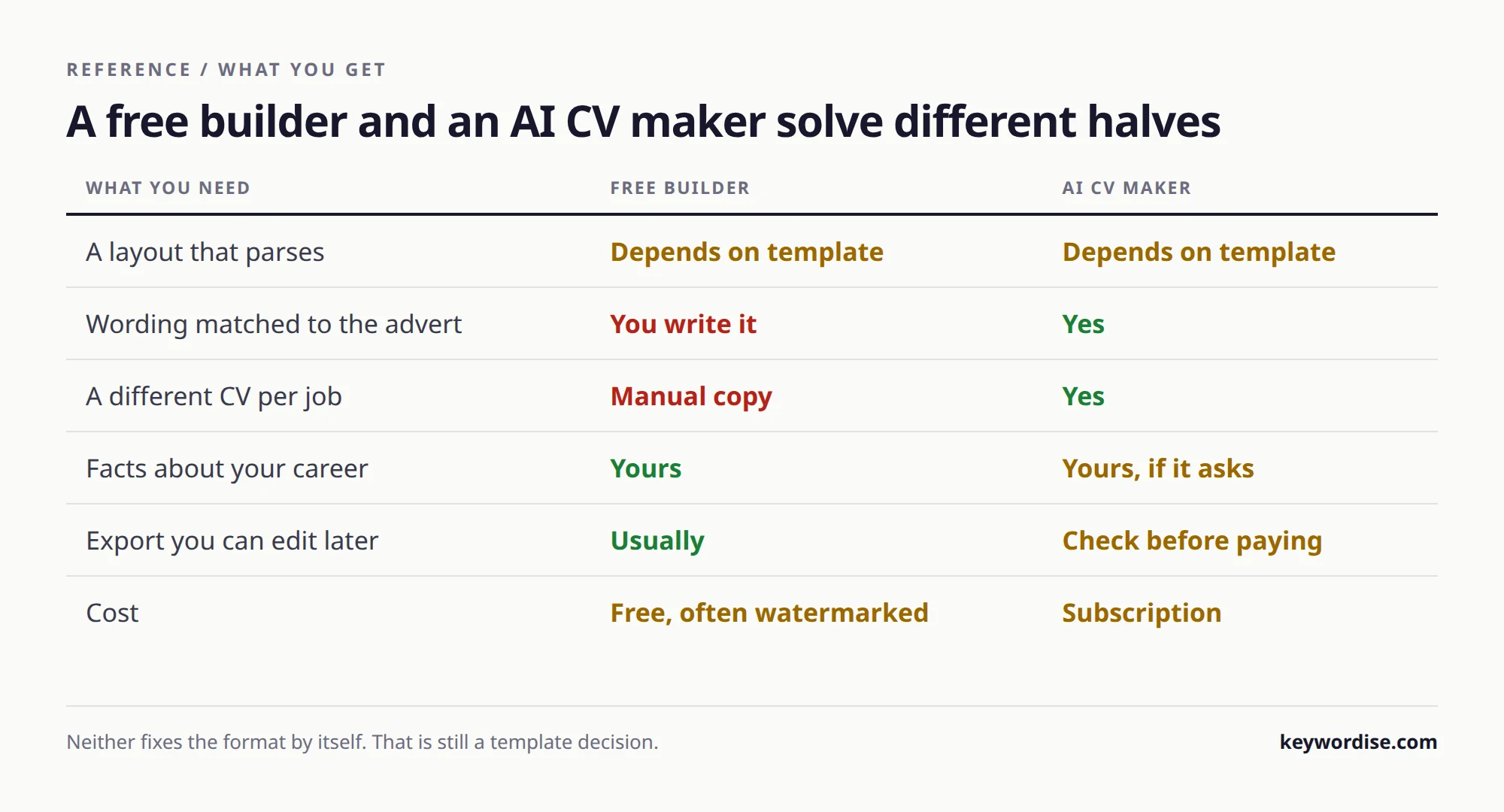
A template builder solves layout. An AI CV maker solves relevance. Neither solves the other, and you usually need both.
| Free template builder | AI CV maker | |
|---|---|---|
| What it does | Puts your text into a designed layout | Rewrites emphasis against a specific posting |
| Typical price | Free, often paywalled at download | Subscription |
| Main risk | A two-column template that does not parse | Invented experience you cannot defend |
| Worth it when | You have no CV at all yet | You apply to many different roles |
What free actually costs you
The common failure of a free builder is not the price, it is that the prettiest templates are the ones that parse worst. Two columns, sidebars and skill rating bars are exactly what a designer reaches for and exactly what an extractor loses.
We measured this on our own document: the same CV scored 4 out of 9 parser checks as a designed two-column file and 9 out of 9 as a single column, with 15 sidebar fragments landing inside job entries. The full method is in what actually parses in 2026.
- Check whether the free tier lets you download at all before you invest an hour.
- Prefer a single-column template even when the two-column one looks better.
- Export and paste into a plain text editor before you trust any builder's output.
- Watch for skills rendered as bars or stars, which carry no text for a parser.
When an AI CV maker is worth paying for
The break-even is the number of different roles you apply to, not the number of applications. One role type and a good base CV needs no subscription. Five role types across two languages is where tailoring by hand stops being realistic.
A tailored application takes 20 to 40 minutes by hand. At five role types that is a working week before you have sent anything, which is the real argument for automation, not the marketing one.
How to choose in practice
Pick the tool by what you are missing: a document, relevance, or time. Those three needs point at three different products.
- Missing a document: a free single-column template builder is genuinely enough.
- Missing relevance: see how AI tailoring actually works before paying for it.
- Missing time: compare the tools that apply for you.
- Unsure how much volume you even need: work backwards from interviews.
The paywall pattern, and how to spot it in 30 seconds
The most common complaint about free resume builders is not quality, it is discovering the charge at the export step after an hour of work. The tell is always the same: the pricing page does not mention download, and the editor never shows you a preview of the finished file.
- Open the pricing page before the editor, and search it for the word download.
- Build a two-line draft and try to export it immediately, before investing effort.
- If export requires an account, make the account before you write anything real.
- Check whether the free tier watermarks the file, which is a paywall by another name.
What a subscription actually buys, priced per application
Divide the monthly price by the number of applications you will genuinely send, and compare that to twenty minutes of your own time. At five applications a month a subscription is expensive per use; at forty it is cheaper than the coffee you drink writing them.
| Applications per month | Cost per application at 20 EUR/mo | Verdict |
|---|---|---|
| 5 | 4.00 EUR | A free builder plus your own editing wins |
| 15 | 1.33 EUR | Borderline, depends on how many role types |
| 40 | 0.50 EUR | Cheaper than the time it replaces |
| 100 | 0.20 EUR | Only sensible if the tailoring is automated |
Five questions to ask any builder before you commit
Every one of these has a checkable answer, and a tool that dodges any of them is telling you something.
- Can I export without paying, and without a watermark?
- Is there a single-column template, and is it the default?
- Does the export contain real selectable text, or an image of text?
- If it rewrites my content, can it show which line each sentence came from?
- Can I get my data out as plain text if I stop paying?
Do you need a designed template at all?
Not necessarily: MIT's career office advises starting from a blank page, because resume templates become increasingly difficult to edit with time. It asks for a standard, consistent format that recruiters recognise, since they do not have time to search a resume for information.
Its specifics are plain: a conservative font no smaller than 10 point, margins of at least half an inch on all sides, and one page unless you have extensive experience or an advanced degree. Nothing in that list needs a paid design tool.
What should a resume contain, whichever tool you use?
CareerOneStop, the US Department of Labor's site, gives a typical order: contact information, an optional summary, skills if they are key to the job, education, then work history from the most recent job backwards. It recommends one to two pages and relevant jobs from the previous 10 to 15 years.
- Put education near the top only if it is essential for the job or you are a new graduate.
- If you have frequent job changes or gaps, start with a skills section of three or four major skills.
- Use simple, current language and avoid jargon unless it is integral to the job.
- Ask other people to check grammar, spelling and how well the resume addresses the job description.
Does a template with a photo slot help?
For US resumes, no: MIT says photos are generally not preferred, and Harvard's career center lists a picture, age and gender among the things not to include. Harvard also notes that resume guidelines can vary from country to country.
Many free builders ship templates with a photo slot because the design looks fuller that way. Check the norms of the country you apply to before you keep it, and treat a mandatory photo field as a reason to look at another template.
Sources
Every source here was fetched and checked before it was linked. Our own parser numbers are reproducible: render the same CV in both layouts and extract it.
- OneHour Digital, ATS filtering and keyword screening statistics
- Huntr, how applicant tracking systems actually work (1.7M+ applications analysed)
- MIT Career Advising and Professional Development, resumes
- CareerOneStop (US Department of Labor), resumes
- Harvard College Mignone Center for Career Success, guide to creating a strong resume
Stop sending the same CV
Keywordise writes a fresh, truthful CV for every job and applies for you. 7-day free trial, 5 free applications, no card.
Start free →Frequently asked questions
What is the best free resume builder in 2026?
The best free option is whichever one exports a single-column document without a paywall at download. Test that before investing time: many free builders let you design for an hour and then charge to export. Layout quality matters less than whether the file parses.
Is a free CV maker good enough?
For a first document, yes. Free template builders solve layout, which is a real problem if you are starting from nothing. They do not solve relevance, so you still have to tailor the wording per posting yourself.
What is the difference between a resume builder and an AI CV maker?
A builder puts your text into a designed layout. An AI CV maker reads a job description and rewrites emphasis and ordering against it. They solve different problems and most comparison pages never separate them.
Do free resume templates pass the ATS?
Often not, because the most attractive templates use two columns, sidebars and skill bars. We measured the same CV at 4 out of 9 parser checks in a two-column layout and 9 out of 9 in a single column. Choose the plainer template.
Is an AI resume builder worth paying for?
It depends on how many different role types you apply to, not how many applications you send. One role type and a solid base CV needs no subscription. Five role types across two languages is where tailoring by hand stops being realistic.
Can I make a CV for free without signing up?
Some builders allow it, many do not. If avoiding signup matters, check the export step first, because that is where the requirement usually appears rather than at the start.
Which format should the builder export?
Single-column PDF for email, and DOCX where an upload box accepts it, because DOCX parses more reliably across older systems. Whatever it exports, paste it into a plain text editor and read what a machine sees.
Do I still need to tailor a CV made by a builder?
Yes. A builder produces one good document; a posting needs the summary and the first bullet of each role pointed at it. That step is what changes screening outcomes, and no template does it for you.
Cite this article
Free to quote with a link to this page.
APA Keywordise. (2026, September 18). Free resume builder vs AI CV maker: what you actually get. Keywordise. https://keywordise.com/blog/free-resume-builder-vs-ai-cv-maker
MLA Keywordise. “Free resume builder vs AI CV maker: what you actually get.” Keywordise, 18 Sep. 2026, https://keywordise.com/blog/free-resume-builder-vs-ai-cv-maker.